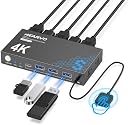
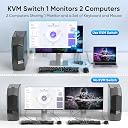
🚀 Elevate your workspace: One monitor, two computers, zero hassle.
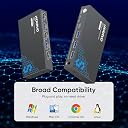
The Steetek USB 3.0 HDMI KVM Switch enables professionals to control two computers via a single 4K@60Hz monitor, keyboard, and mouse setup. Featuring three USB 3.0 ports for ultra-fast peripheral sharing, HDCP 2.2 compliance for protected content, and adaptive EDID for stable video output, it offers seamless switching through both a push button and a wired remote. Plug-and-play design with no external power needed makes it an efficient, clutter-free solution trusted by thousands.


| ASIN | B0D5D4FK1H |
| Best Sellers Rank | #1 in KVM Switches |
| Brand Name | Hearvo |
| Circuit Type | 2-way |
| Color | Black |
| Connectivity Protocol | HDMI |
| Connector Type | Plug In |
| Contact Material | Aluminum |
| Contact Type | Normally Open |
| Control Method | Remote |
| Current Rating | 1 Amps |
| Customer Reviews | 4.3 out of 5 stars 485 Reviews |
| Included Components | kvm |
| International Protection Rating | IP20 |
| Item Dimensions | 6.4 x 5.9 x 0.8 inches |
| Item Height | 0.8 inches |
| Manufacturer | Steetek |
| Material Type | Aluminum |
| Model | STK-S7232H |
| Mounting Type | Desktop Installation |
| Number of Items | 1 |
| Number of Positions | 1 |
| Operating Voltage | 5 Volts (DC) |
| Operation Mode | ON-OFF-ON |
| Specification Met | Hdmi |
| Switch Type | Push Button |
| Terminal | Blade |
| Unit Count | 1.0 Count |
| Upper Temperature Rating | 80 Degrees Celsius |
A**P
Reliable, Solid Performer — My Experience with the Steetek USB 3.0 HDMI KVM Switch
I’ve been using the Steetek USB 3.0 HDMI KVM Switch (1 Monitor / 2 Computers, 4K@60Hz) for several weeks now, and it has consistently delivered on the “reliable” promise. Here’s why: 1. Stable switching between machines: Switching from my desktop to my laptop has been rock-solid. The device doesn’t drop input, stutter, or glitch when using the button or the wired remote. just works. That consistency is exactly what I was missing in other products. 2. Strong video performance without flicker or dropouts I run a 4K@60Hz monitor, and this KVM maintains the display signal without flickering or momentary black screens, even when switching back and forth. The “Adaptive EDID” feature appears to help it negotiate and retain stable video resolution. 3. Reliable USB peripheral handling The three USB 3.0 ports are a nice bonus. I have multiple devices (keyboard, mouse, external SSD) plugged in, and switching rarely interrupts or confuses the devices. I haven’t encountered “missing device” or recognition issues. 4. No external power, yet consistent performance Despite being bus-powered only, the unit maintains consistent performance under normal loads. That’s one less cable and one less point of failure. The “plug and play” nature saves hassle and reduces one potential weakness. 5. Build quality and support confidence The unit feels solid and well-built. The inclusion of a “lifetime Protection Plan” seems to support that. Also, the brand has placed it high in the KVM rankings (ranked #3 in KVM Switches on Amazon) which suggests broad adoption.
T**K
Smooth Switching Between PC and DeX — That Remote Button Is a Game-Changer
I picked this up to switch between my TV-connected computer and my phone running DeX, and I’m genuinely impressed. As someone who installs KVMs professionally and works in IT, I’ve used everything from basic manual switches to enterprise-grade setups — and this little unit just works. Setup was plug-and-play easy (though I’ll admit, I’ve probably got an unfair advantage there). I had it up and running in under five minutes, no fuss. It handles both HDMI and USB switching flawlessly, which is crucial for my setup. The star of the show? The remote input switch button. I didn’t think I’d care about it, but now I can’t imagine going back. Instead of fumbling behind the TV or tapping an awkward button on the device, I just hit the remote and bam — instant switch. It’s a small thing that makes a huge difference in daily use. It also plays really nicely with DeX — no "display disconnected" issues when switching inputs, which is vital. Some switches drop the signal entirely when switching, and DeX freaks out. This one doesn’t. The inactive device still thinks it’s connected, so when I switch back, everything is right where I left it. Pros: Remote button is incredibly convenient Flawless switching between systems No signal drop or disconnect issues — perfect for DeX USB and HDMI both switch cleanly Setup was fast and painless Cons: None so far — this thing just works If you’re toggling between a phone (especially with DeX) and a PC or second system, this is a fantastic KVM solution.
S**N
Tech upgrade I never knew I needed
The USB 3.0 HDMI KVM Switch turned out to be one of those small tech upgrades that makes a big difference. Setup was effortless — just plug in the included USB cables, connect your monitor, and you’re ready to go. Within minutes, I was smoothly switching between my personal laptop and work computer without any lag or fuss. The transition takes about 20 seconds, which feels almost instant when you’re multitasking or moving between projects. The 4K@60Hz video quality is crisp and consistent, with no flicker or signal drop even when streaming or gaming. I was pleasantly surprised by how well it handled both my high-resolution monitor and connected peripherals like my mouse, keyboard, and external hard drive. It truly feels like both computers are fully integrated, and the EDID adaptive feature ensures everything stays perfectly in sync no matter which system I’m on. What makes this KVM switch such a great find is its balance of performance and affordability. It does everything the pricier models promise — reliable switching, clean visuals, stable USB connections — but at a fraction of the cost. For anyone juggling multiple computers, whether for work, gaming, or creative projects, this little device is a total game-changer. Simple, smart, and dependable — exactly how tech should be.
S**E
Better than expected
It's hard to get anything decent these days without paying a lot for it. For less than $50 bucks I figured this was just a generic KVM but I'm really happy with it so far. The USB switch is immediate and the video is crisp and clear. I use these quite a bit for a 2nd computer that I use for wiping hard drives. It works so well sometimes I forget it is swapped over to the 2nd computer and I get frustrated because the mouse isn't working but it is, lol, on the other computer. Anyway, super easy to hook up and use. A great space saver if you have a 2nd pc or even a laptop. Definitely would recommend this if you are looking to clean up some space with your computers.
J**N
Compact and works great!
I bought this KVM switch for my wife, and it works great. It’s small and easy to use, which is perfect for her desk. She can switch between two computers with just one button, and it shares the monitor, keyboard, mouse, printer, and even her hard drive. The picture quality is sharp, and everything connects smoothly. Setup was quick, and the included cables made it even easier. If you want something simple that does the job well, this is a solid choice.
R**F
It will work
I got this item, hoping to eliminate a monitor. Let's just say, it works as it should and I'm happy with the results. That being said, I will elaborate on my experience. At first it did not work, basically because one of my computers has no HDMI, It is old and runs Vista OS, and only has a VGA or display port. Long story short, USB to HDMI, VGA to HDMI did not work. Display port to HDMI did work, finally. Of course it was the only one I didn't have on hand. Tech support was good, but slow. Email was the only way I found to contact them, but they did respond and were ready to help. They also asked me to put this on here to help anyone else that may run into this problem. Keep trying, it works great. Now I have a monitor for sale. HA ha ha/
M**K
Great little switch
My husband got me this little KVM switch because I work from home and I have two laptop computers on a small computer table. I was complaining that I don't have enough room on my home computer for both laptops, two monitors, two external keyboards, and two computer mice. It can be a pain in the rump to switch computers when I'm in the middle of one task and then need to hop on the other computer real quick for something. I would have to totally change my seating position, move my hands from one keyboard to another, move my hands to a different mouse, and sit in front of a different monitor. With this little switch, I just have to push a button and then, bam, I'm on the other computer! So helpful!! I'm so glad he got me this little gadget. It's worth every penny! I gave it 4 stars instead of 5 because the instructions were a little confusing and because there is a slight delay to switch computers. But, it's a very great value...especially for the price! Highly recommend.
R**Z
Works Perfectly for Switching Between Two Computers!
This KVM switch has made my setup so much easier! I can now control two computers with the same monitor, keyboard, and mouse without constantly plugging and unplugging cables. The 4K resolution at 60Hz looks great, and there’s no lag when switching between devices. Setup was quick and straightforward, and the included cables make it even more convenient. The controller button is super handy for switching instantly. It’s solid, reliable, and exactly what I needed for my home office. Highly recommend!
Trustpilot
2 weeks ago
2 months ago