🚀 Upgrade Your Storage, Upgrade Your Game
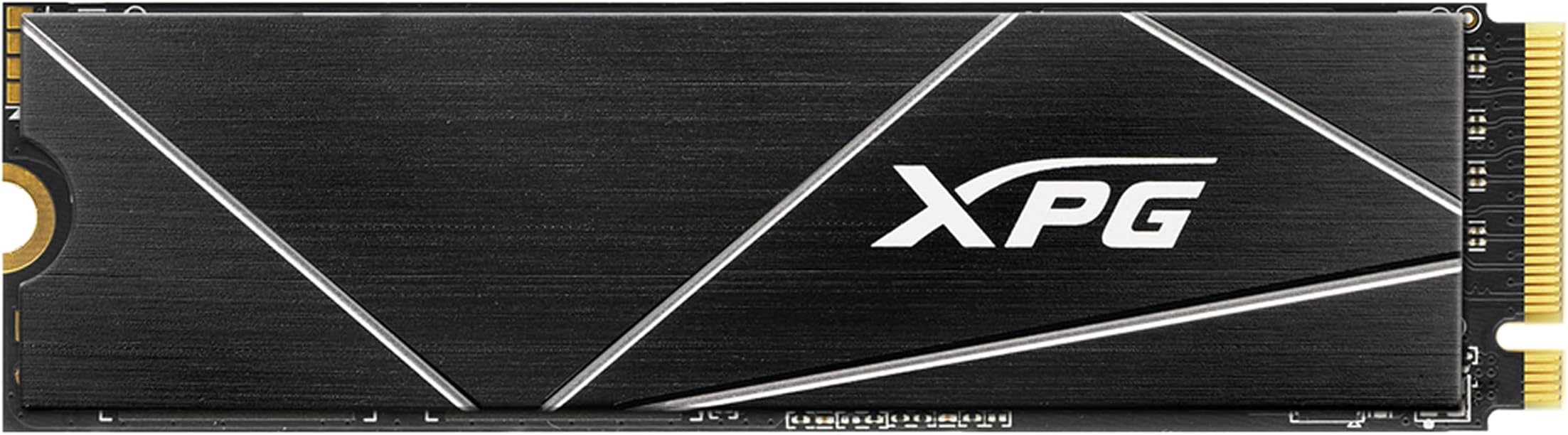
The XPG GAMMIX S70 BLADE is a high-performance PCIe Gen4 M.2 SSD delivering blazing read speeds up to 7400MB/s and write speeds up to 6800MB/s. With a spacious 2TB capacity and an aluminum heatsink for superior thermal management, it’s designed for gamers, creators, and PC builders seeking reliable, next-level storage. Fully compatible with PS5, laptops, and desktops, it offers seamless installation and robust durability backed by a 5-year warranty.


| ASIN | B093DNV47J |
| Additional Features | Portable |
| Best Sellers Rank | #222 in Internal Solid State Drives |
| Brand | XPG |
| Built-In Media | SSD |
| Cache Memory Installed Size | 2 |
| Color | 7400/6800MB/s [S70 Blade] |
| Compatible Devices | Desktop, Gaming Console, Laptop |
| Connectivity Technology | PCIe |
| Customer Package Type | Retail packaging |
| Customer Reviews | 4.6 out of 5 stars 12,247 Reviews |
| Data Transfer Rate | 7400 Megabytes Per Second |
| Digital Storage Capacity | 2 TB |
| Form Factor | M.2 2280 |
| Hard Disk Description | Solid State Drive |
| Hard Disk Form Factor | 2.5 Inches |
| Hard Disk Interface | NVMe |
| Hard-Drive Size | 2 TB |
| Hardware Connectivity | Solid State Drive |
| Installation Type | Internal Hard Drive |
| Item Dimensions L x W x Thickness | 3.15"L x 0.87"W x 0.14"Th |
| Item Height | 3.5 millimeters |
| Item Type Name | SSD |
| Item Weight | 0.4 Ounces |
| Manufacturer | ADATA |
| Media Speed | 6800 megabytes_per_second |
| Model Name | S70 Blade |
| Model Number | AGAMMIXS70B-2T-CS |
| Number of Items | 1 |
| Read Speed | 7400 Megabytes Per Second |
| Specific Uses For Product | Gaming, Multimedia, Personal |
| UPC | 842243025491 |
| Warranty Description | 5 year manufacturer limited warranty |
P**.
This SSD Is Legit For PS5/Best Bang For Your Buck
I originally sat on getting an SSD because they were so pricey. I get the 1TB SSD aren’t to steep in price but I feel like with PS5 and next gen 1TB isn’t enough and will take all that space up quickly. Especially if you are a gamer like myself. Plus I had a external 2TB hard drive(from the PS4 generation) granted you could only play PS4 games on it and store PS5 games but not play them. I finally pulled the trigger seeing the 2TB XPG Gammix S70 Blade was on sale for $249. Had some Christmas money to spend so out of pocket I paid maybe $125. This thing is a beast and worth my money if you ask me. I didn’t use the heat sink that comes with the SSD and instead opted to get the MHQJRH M.2 2280 SSD Heatsink, Double Sided Heat Sink With Thermal Silicone Pad For PC/PS5. The only part that was difficult was putting the heatsink and SSD together and installing it into the PS5 and even that isn’t very difficult. There are a lot of how to videos online and even on Amazon. The heatsink I mentioned has a video of someone installing that heat sink with a SSD and I went off that. Worked like a charm and I was able to install it my first try. When you boot your PS5 your prompted with a message saying you have a M.2 SSD and it needs to be formatted. I formatted it and I was given a read speed of 6270. Which is 700 more than the SSD on your PS5 motherboard. When I went to settings and checked the storage it was there with my external hard drive and it said I had 2.05TB free. Good to see that you actually get 2TB and a tad bit more. First thing I did was transfer games from SSD to SSD. I took Horizon Zero Dawn moved it from internal to the newly installed SSD and it transferred in 10 seconds. No joke 10 seconds. Than I took The Uncharted Collection from my external hard drive and transferred it to the new SSD that one took a bit longer due to the external not being no where near as fast as a SSD but even that took about 7-10 minutes. Last I took three games from my library Hollow Knight, Darksiders 3 and Far Cry 6 and installed them(not transfer actually install from scratch) and those three games took about 20 minutes tops. That being said this is a affordable SSD and it is legit in speed. I played Horizon Zero Dawn and Far Cry 6 and load times were identical to the mother board SSD. Can’t complain I’m a happy camper with my purchase. I now have the internal SSD of 667GB with a 2TB extra storage installed along with a external hard drive giving me 4.6TB of space. Which I personally think is more than enough to last the PS5 generation. That being said do yourself a favor and get this product it’s worth every penny if you ask me. Hardest part is the installation process but even than, it’s not that difficult.
R**D
PS5's secret
Heat sink version works brilliantly in the PS5, intentionally WITHOUT the slot cover (read below). It fits clean under the system's outer shell, which is all that actually matters for space sake. Speeds are noticeably (but not by much) faster, than the built-in drive. What no one, save for those truly tech-savvy in these matters (i.e., have built high-performance or gaming PCs from components, or the like), seems to understand about the PS5's expansion drive slot cover, is that it is ONLY to protect the empty slot, and it is not needed (nor should it be used*) once a drive is actually installed. Why, you ask? One answer: AIR FLOW! Heat sinks work by drawing the heat of the device into itself, then allowing open air to flow through the heat sink and remove that heat (often supplemented by fans). The slot space has NO air flow available to it whatsoever. Just check around the inside of the space and you'll realize that there are no gaps or slots for air to enter or exit the space, especially when the cover is in place. Meaning? Any drive added to the slot, w/ or w/o a heat sink, will stew in its own heat while it is entombed in the slot w/ the cover on. *Moreover, the drive will run HOTTER than intended and likely begin to fail (run noticeably slower, until no longer accessing some, then any data) within months, depending on frequency of use. Also note that said slot, having no air spaces, also protects the PS5 from the heat of the drive, which has immediate access to the air duct on that side of the system (UNLESS the cover is in place). Take it for what you will, but we hardware tech-heads know that speeding up a microprocessor, RAM solid-state storage unit means causing it to run with more power and generate more heat, but for these NVMe super high-speed drives, skin-burning levels of heat are quickly and easily generated. Though they are spec'd for high heat, this much potential heat is likely failure-fatal. For a drive that can cost about half to 3/4s (or more) of the the price of the PS5, itself, it's your call...
J**R
Perfect for your PS5!
We're one of the lucky ones who have managed to score a PS5, so we were super happy when they finally turned on the ability to add another SSD. This came highly recommended by a couple tech sites as the perfect all-in-one kit for the non-tech minded, and the price was very competitive with buying pieces individually. I will say the heat sink doesn't inspire a lot of confidence at first glance. It's a strip of metal stuck on with thermal double-sided tape, instead of being an entire enclosure. That said, I've seen a few sites saying this is all you need, so I guess why over-engineer something? It was a snap to put on, and the whole thing was easy to install. My PS5 found it right away and had no problem formatting it. The read/write speeds registered a bit slower than advertised, something like 6900 instead of 7400, but still completely adequate to the task. Files copy to it lightning fast, and playing from it is just like playing from the built-in SSD. Get this for a fast, easy solution to your storage needs!
N**E
Great SSD for the price & YES it i compatible with mac.
For a budget NVME drive its great. Honestly i was on the edge ordering this thing because of the following on the product page "This SSD is not compatible with Mac. Additional parts may be required to use on Mac system.". This statement is confusing and should be removed. I did all kinds of research before ordering this ssd to see why in the world it would not be compatible with the Mac. Thankfully the statement is wrong. My best guess is people are confusing and ordering this for their mac and expect to replace their internal mac ssd (which is proprietary and you can not change) and end up returning the drive. So yes if your computer/mac doesn't have a nvme slot then of course this will not work but it is, in fact, compatible with a mac. I just received my m1 mac mini I ordered the smallest ssd space apple offers (256GB) because apple charges way to much for upgrading the storage (i think ~$800 for 2TB). So i wanted increase my storage with a Thunderbolt 3. So i ordered an OWC Envoy Express Thunderbolt 3 SSD enclosure. I did send a message to adata about their statement it not being compatible with Macs and explaining to them what i was planning to do (external thunderbolt 3 enclosure) and they pretty much sent me a caned response that the drive is made to be directly on a motherboard. I didn't listen and ordered it anyways. There is no reason any nvme ssd shouldn't work correctly unless it has a firmware issue. It not working didn't make any sense at all. So anyways i received the drive and its working great. The speeds aren't as fast as advertised but that was expected as its not a limitation of the drive but of the owc enclosure. So purchasing a more expensive ssd would have been a waste of money because i can't even max out this ssd. Its not as fast as the internal mac ssd but close enough where most people aren't going to notice a difference. The slc cache is pretty big on this drive so your not going to see big speed decreases very often unless your pushing some huge files to drive often (say like VMs or something like that). The speed does decrease quite a bit once the slc cache gets exhausted but recovery is very quick. I'm very happy and its a great price for a 2TB SSD. One thing to note if you are using on a mac the only pain is going to be that your not going to be able to use adata software suite (its only made for windows). Before i used the ssd i popped it into my windows desktop but it was running the latest firmware. I think you could update it if you have a windows PC with an external thunderbolt connector but i'm not 100% sure because i haven't tried it. To bad they don't have the software available for mac.
N**B
XGP GAMMIX S70 Blade - Easy to Install, Faster than Expectations!
Just got this yesterday (2/24/22), as soon as I got home from work I popped it in my PC to verify its Firmware and check if it needs to be updated. --------------- TL;DR - Not for beginners/non-electronic users. There was some hiccups because it depends on how your Motherboard BIOS/UEFI is setup because you have to make sure your M.2/NVMe slot is enabled, its PCH setting is correct and finally your Disk Configuration ASCII/RAID etc is correct to ensure correct boot-loading. ---------------- So once thats configured and you boot into your OS, the Drive should be recognized by your system, you just need to Allocate and Format it. Download the latest version tool from the Adata XGP site, then check its Firmware. All the new ones should be latest Firmware in the box, because the previous Firmware had compatibility and soft-bricking issues. Mine was already up-to-date. So next step? Shut down, removed it, put my PC side back on, then popped open my PS5! Yes I bought the XGP GAMMIX S70 Blade 2Tb for my PS5. It fits perfectly inside WITH the Heatsink on it and the M.2. cover closed. Just make sure to use that spacer disc and scree that hold it in to keep the NVMe Drive in place or it will fail to boot correctly (no display or other potential issues). Booted up my PS5 and it recognized it right away. Asked to format and it also tests the speeds. In the description it rates the S70 Blade at about 6,100Mbps, this tested at 6,200 and change. Either way its quite impressive. To test out on the PS5, I transferred about 230Gb worth of games I wasnt actively playing to the S70 Blade, which took less than 10 minutes, maybe even less time. It happened fast. Last time I transferred about 110Gb to a 4Tb Western Digital USB External HDD, took about 35-40 minutes. I definitely will update later as time goes along if there is anything different with positives or negatives.
J**A
A good brand seems to hold up
I bought a 2tb version if this card for my ps5 was gonna swap it out for this one but then I just ended up deleting more stuff and its been just sitting around collecting dust i might use it eventually if I get a new desktop computer or laptop or might just encased it and use as just a storage drive i can hold a good amount on 4tb and I got it on black Friday for same price i basically paid for the 2tb...all in all i havent had a single issue with the memory chip! Seems like a good reasonable brand . Pretty decent pricing most of the time!
D**A
Awesome for expanding ps5 storage
The XPG GAMMIX S70 Blade is a PCIe Gen4 M.2 2280 internal gaming SSD that is compatible with the PlayStation 5. It is capable of up to 7,400 MB/s sequential read speeds and 6,800 MB/s sequential write speeds, making it one of the fastest SSDs on the market. This means that you can experience faster loading times and smoother gameplay on your PS5. The XPG GAMMIX S70 Blade is also very well-built. It is made of a durable aluminum alloy and it has a heat sink that helps to keep it cool. This makes it a great choice for gamers who want an SSD that can withstand the rigors of heavy use. I have been using the XPG GAMMIX S70 Blade for a year now, and I have been very impressed with its performance on my PS5. Games load up instantly, and I haven't had any problems with stuttering or lag. I highly recommend this SSD to anyone who is looking for a fast and reliable gaming SSD for their PS5.
A**R
Good price to performance
I have only used this SSD for about a month but it works well and is fast. My only issue is that I put the heatsink on a little incorrectly and was unable to remove it(my fault entirely). This SSD has great price to performance and I hope it lasts.
Trustpilot
2 weeks ago
1 month ago