


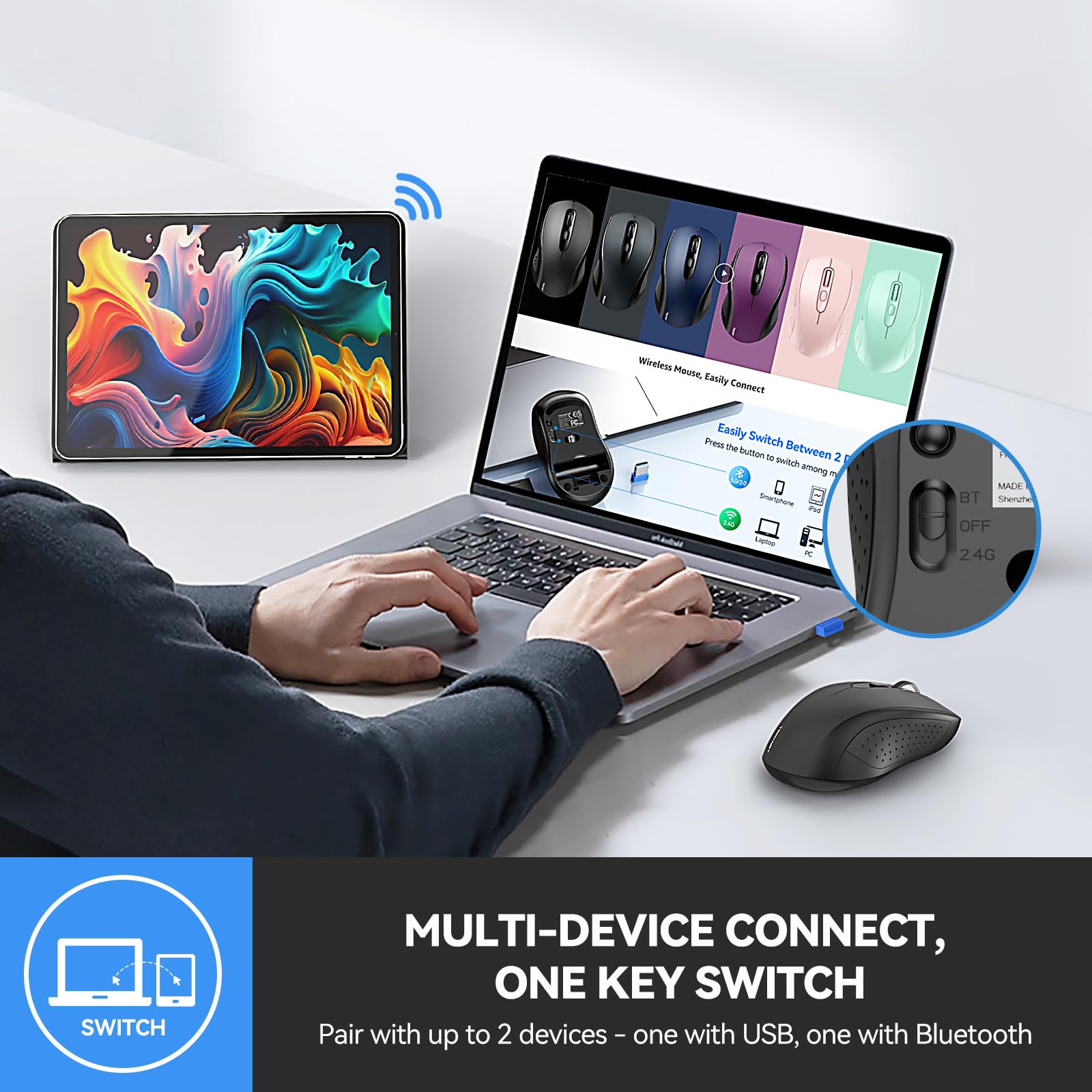


🖱️ Master your workspace with the ultimate dual-mode mouse—because switching should never slow you down.
The TECKNET Bluetooth Mouse is a sleek, portable 2-in-1 wireless device featuring Bluetooth 5.0/3.0 and 2.4GHz USB connectivity. It supports seamless switching between two devices, offers 6 adjustable DPI levels up to 4000 for precise tracking, and boasts an ergonomic compact design. With up to 18 months of battery life and a built-in nano receiver storage, it’s engineered for professionals who demand flexibility, comfort, and long-lasting performance.


| ASIN | B082V7PWD1 |
| Batteries | 1 AA batteries required. |
| Best Sellers Rank | #54 in Computer Mice |
| Customer Reviews | 4.4 4.4 out of 5 stars (8,367) |
| Date First Available | December 17, 2019 |
| Department | All ages |
| Is Discontinued By Manufacturer | No |
| Item Weight | 2.26 ounces |
| Item model number | EWM01832 |
| Manufacturer | TECKNET |
| Product Dimensions | 4.21 x 2.48 x 1.54 inches |
S**S
Best mouse ever.
I purchased this mouse 3 years ago. Initially I purchased it because I was working 2 remote jobs and it allowed me to maximize the space on my desk by switching between the computers I had on there. Now I use the mouse for one computer (although the switching between Bluetooth and USB capabilities still work) and it’s the best mouse I’ve ever used. The Bluetooth connection is seamless, it’s incredibly easy to use, the design of the mouse is comfortable in my hands, the grips on the sides are still in great condition and haven’t gotten gross or anything, it’s compatible with Windows and Mac computers. Best money I’ve bet spent on a piece of office equipment, it works so well it’s even kept me from buying an Apple Magic Mouse.
B**N
Great Mouse for an Inexpensive Price
This is a great mouse. I have actually bought this mouse twice. The Bluetooth connectivity works perfectly with my various computers and tablets. The usb A dongle works fine too, but I prefer bluetooth. No interference issues with the bluetooth. The mouse is a little bit small, but it's still big enough for me. And I have rather large hands. The battery life is incredible and it runs off of one AA battery. I use rechargeable batteries so I don't have to buy disposable ones. It definitely lasts multiple weeks of everyday usage on one charge. It's also a very inexpensive mouse, but you get a lot for your money. The cheapest one I bought was only nine dollars. I also use it for gaming. No problem, it is sensitive enough and responsive enough. It also has 2 extra side buttons, so that you can map controls to those buttons for certain video games. Definately recommend!
A**R
Great, inexpensive BT mouse!
Inexpensive but works like a charm! Works every bit as good as more expensive BT mouses I've bought in the past. Will definitely buy again when I need another new mouse.
L**L
Good mouse, but there is an issue about the button behind the scroll wheel...
I paid $10.98 for mine, now the price is $13.99, but there is a $2 coupon. Regardless, it's a good little mouse for around 10 bucks. It seems very much like a low end Logitech mouse. I wouldn't be surprised is they are made at the same place, with many of the same parts. It works well. But, what about the buttons? My instructions came with a sheet explaining the button functions in several languages, but not English? It's easy to figure out the BT (blue tooth), Off, 2.4G switch on the bottom. Also, easy to guess the button above it is to set up Bluetooth, hold for a few seconds. But, the button on top, behind the scroll wheel, what's it for? I kept mashing it and nothing happened! The instructions were useless. Even the internet was no help for THIS model mouse. Meanwhile, if you leave it set for awhile it goes to sleep while using it as a BT mouse for Macbook. To get it going again I would move the switch back and forth on the bottom, but that was inconvenient. Eventually, I wrote a question here at the Amazon site and got a reply from a helpful user that it was an "awake" button for using BT. Sure enough he was right. If the mouse is asleep, tap it once and a couple seconds later it's awake. BUT! The company ALSO wrote me an answer saying it's a DPI adjusters which I don't understand exactly, but in any case, repeatedly mashing the button doesn't do anything that I can tell. I think it's a "awake" button. Anyway, so far, a good little mouse. BTW you got to have your own battery, none comes with it. I am giving it 4. Probably would have been a 3, but the price is very good. Why no one else mentions the button issue makes me suspicious of the 5 star ratings. There must be real owners with the same issue as me.
W**.
Surprisingly great mouse, highly recommend, especially for Linux folks
I don't normally go out of my way to write reviews on Amazon, but after having a frustrating couple years' experience with mice (mouses?), i felt compelled to get on here and express how happy i am with this one. I've owned many mice over the years, normally i buy Targus or Logitech if I can. Targus used to make a really nice one with an optical top-side scroll that allowed you to scroll not only up or down but left and right too, that may have been my all-time favorite up 'til now, but they no longer make it. It died several years ago, and since i've gone through many. They never seem to last more than a year or two; it seems sooner or later the main click button wears out or they just stop responding like a power issue, and they need to be replaced. Many times, especially if you use a Mac or use Linux, they just won't work at all, compatibility issues. I've tried a couple Logitech mice the last few times, they seem to be the premier company in the mouse market, so you'd think they'd be good quality. Had a Logitech Pebble, stopped working literally a year and a day after I bought it (also happened to be right after the warranty expired...interesting.) Also disconnected frequently (several times a day), and took some hassle to re-connect. Bought a same model replacement at a Target where Logitech was the only brand they had and the Pebble was the best (and priciest, at $29.99) they had in stock. This time, it worked for about 30 seconds before it too "died", leaving me mouseless again until i could go back to Target to return it. Major inconvenience to say the least, considering that buying a mouse was the 1 and only reason for the original Target visit in the first place. The girl who processed the return asked me no questions about the return, even though I'd already cut open the package, which suggested to me that was not the first time she'd seen people return a defective Logitech mouse. Needless to say, i'm done with Logitech. The other thing about the Logitech mouse, it never seemed to wake up one of my machines, even if the laptop had just fallen asleep. I was always having to re-connect it too. I had just started using Linux around the time i got that, and i always assumed it was a compatibility issue, and had shrugged it off as a pitfall of Linux. Same with another "off-brand" mouse I had used, though that one was the only one I ever had that seemed to connect seamlessly with Linux over Bluetooth (I've found that you usually have to use the USB piece to use a wireless mouse with Linux, Bluetooth seems to be a problem, at least with mice). Not to write a hate-spiel about Logitech here, but it aggravates me greatly that their mice don't work well, especially with their reputation and the price of their stuff. It's like, i live in the richest, most powerful nation in the world, in the most technologically advanced era in history, and i can't get a decent ^#$%ing wireless mouse that will actually work longer than a year!? What does a guy have to do to get a freakin' mouse that works these days? Anyway, I bought this one due to the high ratings, features, and most options for compatibility and connections. Had it maybe a month or two, so i can't comment yet on it's long-term durability. But, it has been life-changing so far. I was skeptical that it would even work, but it does, and it works far better than any other mouse i've had since that Targus of long ago. And it's about half the price of Logitech mice. This mouse will wake up my Linux laptop from the other room, the next day after it's been "asleep" overnight. It turns out Linux isn't the problem; the problem was that the other mice i had and their wireless signal were too weak. This one is also nicely designed, with a more comfortable and ergonomic fit for my hand than a Pebble's small, shallow shape, and i have relatively small hands. I can quickly and easily switch between control of two computers by switching the connectivity switch on the bottom from Bluetooth to USB adaptor or vice-versa. The Pebble could sort-of do that too, if both laptops were "awake", but this one is far more reliable, and is powerful enough to wake up the asleep machine, which Logitech mice can't. Mice are simple devices in principle, easy to take for granted. But in this age where apparently mouse companies apparently either can't build one that that works very well for very long, or don't feel it's in their interests to do so, Tecknet is a godsend. It also comes in a simple, environmentally-considerate cardboard box, which happily proclaims "frustration-free packaging". Well-done, Shenzhen! No scissor-destroying, aggravating, potentially dangerous cutting open of plastic blister-packaging of questionable recyclability. I wish more American companies would take this kind of approach. Room for improvement? Well, the mouse seems to occasionally disconnect randomly from my MacOS-running laptop (I use Bluetooth connection for that one), but it doesn't happen that often, and usually self-corrects after a couple seconds and a bit of mouse-jiggling. There's a thin toggle-button built onto the left side of the gripping area which function as back- and forward- buttons you can activate with a squeeze of your thumb for web browsers. Takes a little getting used to, and it's easy to accidentally click those and switch pages when doing web-surfing, but can actually come in handy when you're used to it and feeling extra-lazy, so I have mixed feelings about that. If you're left-handed though, this is not an optimal placement, and I think lefties will either accidentally click more than righties, or will feel this isn't really "available" to them, as it may take a rather awkward maneuvering of the ring-finger to use. Also, there are quite a few buttons and switches on this mouse, so you really do have to read the manual to get this thing going, and you'll probably have to consult it again from time to time, as i have. All that said, it's an incredible relief to finally have a well-functioning, reliable, high-performance multi-platform wireless mouse that plays well with Linux and MacOS, and that alone gives me reason to rate this at five stars.
G**.
Well made and works as expected.
Very nice mouse that can be connected either BT or included USB 2.4GH receiver.
G**Y
Very nice for the price.
Quick connect to my pc using the USB and compatible with my laptop using Bluetooth. It is very comfortable, not bulky.
I**N
Not bad at all. It's working properly with all kinds of phone, tablet, laptop, etc. Good materials, good feel in the hand.
T**Z
Bardzo dobra myszka w swojej kategorii cenowej (50zł). Szybko się paruje z BT, równie dobrze działa ze swoim nadajnikiem. Baterie bardzo długo trzymają. Nie wyłączam przełącznika na OFF - nie ma takiej potrzeby.
P**E
I intended to connect this 1600DPi mouse to my internal Bluetooth. The pairing was relatively easy and requested less than 3 seconds to be detected at the start. Windows automatically updated the driver, and the final set was quick. Even if it is not a problem for my left hand, I will not recommend it for left-handed people, as both lateral buttons can be inconvenient.
J**O
rato confortável, prático, dimensões porreiras, sensibilidade e precisão de movimentos ajustável, emparelhou por bluetooth instantaneamente, leva apenas 1 pilha AA. A roda e os botões laterais funcionam bem, regra geral tem boa sensibilidade e o peso é adequado. para já tudo funcional!
B**A
Very happy with the purchase. Works wonderfully. I purchased this mouse to replace an aging Wifi mouse where the scroll wheel wasn't tracking properly any more. The documentation indicated that it worked with Linux using the included 2.4Ghz wifi dongle, but I wanted to try using it as a Bluetooth mouse on Linux. I put the battery in the device, set the switch to Bluetooth and moved it around, but it wasn't recognized by my Linux system. So I used my old mouse, accessed my Linux Bluetooth settings, and connected the new mouse to my system. After that it worked flawlessly. I rebooted the system multiple times, and while, it might take an extra second or two for the bluetooth mouse to become active after a reboot, I haven't had any issues since I set it up. The mouse is very light and responsive. The size fits my hand nicely. And the buttons and scroll wheel work great. Even the "Back" and "Forward" buttons on the side of the mouse, (which I don't really use), work great. When the mouse goes to "sleep" to save battery, you need to press one of the buttons to wake it up. I have two other mice that do the same thing, but with this mouse, when you press a button to wake it up, NO ACTION seems to be sent to the computer, which is a HUGE bonus. I use to have to be very careful when waking up my old wireless mice, as you could click a link, or close a program and lose work if you weren't careful. Not a problem with this mouse. And I just ordered a 2nd one for my other computer for this exact reason. Also, it only requires 1 AA battery, unlike my other mice that seem to require 2 AA or AAA batteries, so depending on how long the battery lasts, might be savings to be had in battery usage as well. Overall, I can definitely recommend it for use with Linux (at least on my system) My system is running Kubuntu 25.04 using Wayland (rather than X11) And my hardware is a Trigkey Ser 5 (from Amazon) with an AMD Ryzen 5 5500U CPU with a built-in MediaTek controller supporting Bluetooth v5.2
Trustpilot
2 months ago
1 month ago


